
Retail Orbit: Verify API (For Outside Development)
Once a sku data file has been developed, use the Management One verify pathway to ensure file will be able to process and audit the data being posted. We recommend using Postman for this, but it is not required.
Endpoint Information
|
URL |
https://www.retailorbit.com/api/skudata/verify |
|
Method |
POST |
|
Format |
Text File with | delimiter, .txt |
|
Restricted Characters |
No pipes “|” |
|
File Headers |
First row should be a header row with the corresponding names from the field summary. Case insensitive. |
|
FileName |
{Retail Orbit Client Code}_{Transaction Date}.txt TransactionDate format YYYYMMDD. For a full month upload transaction date = last day in month.
|
|
Upload Headers |
X-CLIENTCODE - Supplied by Retail Orbit. X-CLIENTGUID - Supplied by Retail Orbit. X-FILETYPE - zip or gz X-PERIOD - YYYYMM format. X-PERIODDAY - 1-35 value. X-OVERWRITE - True = Delete all data for the period False= Update data without deletion.
|
|
Success Response |
200 |
|
Error Response |
500, 502 |
|
Notes |
You must have a valid column header for each column. It is strongly recommended that you upload each day in a separate file. This is to eliminate a file being too large to process in a timely manner.
|
Example when using Postman
Headers:
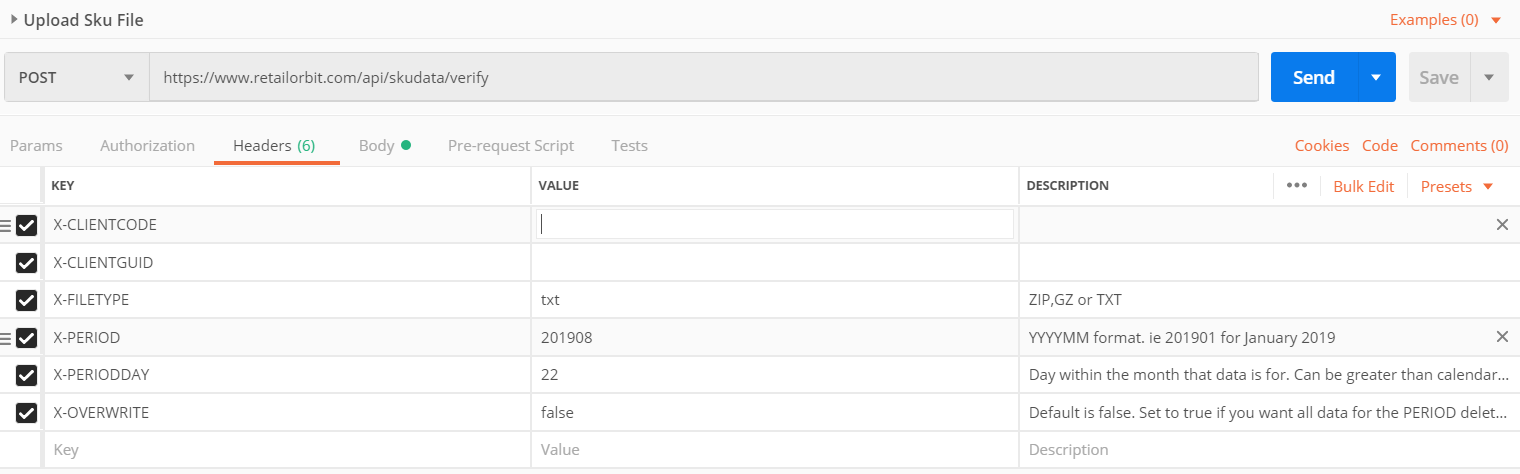
ClientCode and ClientGuid will need to be provided by M1 for proper authentication.
Body:

Once you hit  , the data will pass the endpoint and return an audit on what was posted. Please use the checklist below to determine if the data being posted is ready to be moved to the upload path to begin being used in production.
Note: Time for the output to return is dependent on the size of the txt file posted.
Verify Checklist:
- File totals match the data in the file, i.e. no loss of data in processing.
- File totals accurately represent the total data for the date range being used for a client, this is
- Ideally verified using comparable reporting the client has available to them in the POS.
- Location Codes included should include all possible location codes that client has, no locations are excluded.
- Location totals reflect the data breakdown accurately.
- Location totals accurately represent the total data for the date range being used for a client, this is ideally verified using comparable reporting the client has available to them in the POS.
- On Order totals match the totals in the data text file.
- On Order data broken down by location and yearmonth period accurately represents the breakdown of orders by location and when it is expected to be received, this is ideally verified using comparable reporting the client has available to them in the POS.
- Unique Class List represents all possible classes in client’s taxonomy, nothing excluded.
When each of these has been verified, the data will be considered valid and ready to be moved to upload path where data will process into an M1 database for our planning usage. The only difference when moving to the upload path is that the .txt should be compressed into a zip {.zip} or gzip {.gz}, and the X-FILETYPE upload header would change from txt to zip or gz as well.
Comments
0 comments
Please sign in to leave a comment.